

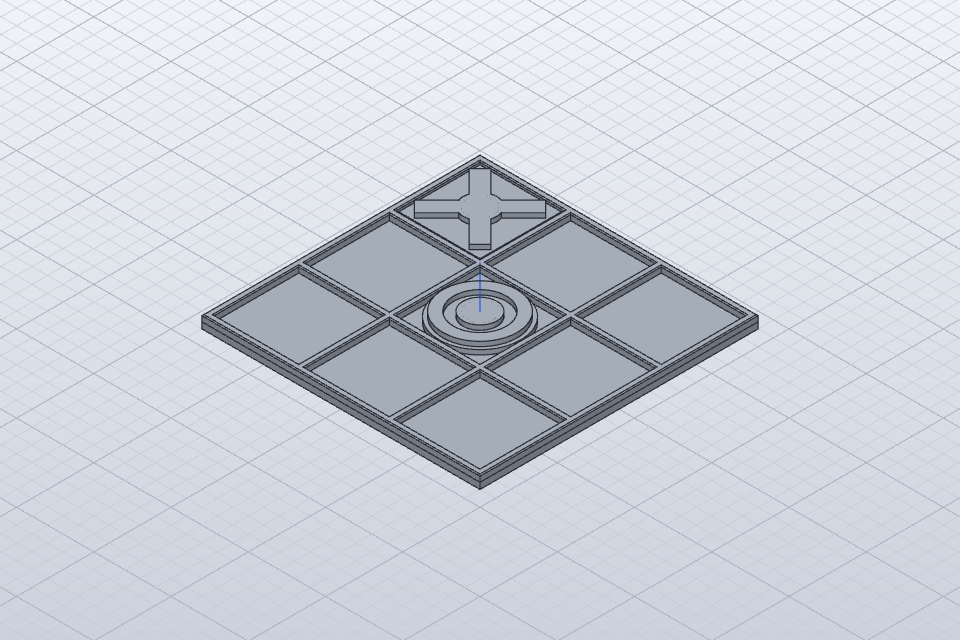
The board and playing-piece models are now included in my tic-tac-toe robot arm project on GitHub. The project brings together the arm firmware, the ESP32-CAM companion and the printable game components. The camera is still a work in progress. My next step is to give the arm a set of fixed off-board positions from which it can collect its pieces and place them on the board.
What is in the project
The top-level README groups the work into three folders:
44-tic-tac-toe-arm/— PlatformIO project for an Arduino UNO R4 WiFi. Six arm servos, with motor 0 as the gripper, drive the poses. Motion is updated on a timer so Wi-Fi and camera HTTP calls do not freeze the servo plan mid-move. The sketch serves game and calibrate pages on the board, and it can ask the camera for a board reading.45-board-camera/— Separate PlatformIO project for an AI-Thinker ESP32-CAM with PSRAM. It is meant to serve the board state the arm consumes, includingGET /boardand related paths such as/capture,/debugand/cells.3d-models/tictactoe/— Board and piece meshes, preview images and the SolidCraft source. The print files live here rather than inside the arm firmware folder.
Open the arm and camera folders as separate PlatformIO projects — each has its own platformio.ini. Wi-Fi details, API keys and the camera address stay on the machine as local copies of the *_example.h templates. Those filled-in headers are gitignored.
Board and piece models
The models folder README names the print files and how they fit together:
- Board:
board.3mfandboard.stl— 180×180 mm. The 3MF hasBoard_BaseandBoard_Grid. Each cell is 54.67 mm square.tictactoe_all.3mfpacks the board with one flat X and one flat O. - One-piece counters:
counter_X.stlandcounter_O.stlfor the flat pieces, plus tower variantscounter_X_tower.stlandcounter_O_tower.stl, and matching*_tower_parts.3mffiles. The one-piece counters include a sealed pocket for an M8 washer; the README says to pause at Z 5.4 mm, drop the washer, then resume so the top layers close the pocket. - Two-part counters: under
two_part/, glue-together base and cap STLs and 3MFs, including versions sized for a 10 mm washer. - Editable source and previews:
tictactoe.solidcraft, pluspreview.png(board with flat counters — the image above),preview_tower.png,counters.png,counters_parts.pngand the exploded two-part previews.
Print colour matches the game roles in the firmware: the human plays yellow O, the robot plays red X. The camera sketch is written to tell those colours apart, so printing in the right colours matters even while vision is unfinished.
How the current software plays a move
The default arm environment builds src/main.cpp, the camera-integrated game. Other environments in the same project cover a cell-sequence motion demo, board mapping, a Gemini connectivity test and a serial-only tic-tac-toe sketch without the camera client.
For each robot X, the documented sequence is: open the gripper at home, move to the pickup pose, close on the piece, lift clear, travel above the chosen square, orient the wrist while raised, lower, open to drop, lift clear and return home.
Move choice works in two stages. On-device minimax evaluates every legal X move and lists the equally best squares. Gemini then chooses among that list. If the returned square is not in the optimal set, or is occupied or invalid, the firmware rejects it and no motion runs. That check is about which square the robot is allowed to play. It does not, on its own, guarantee gripper grip, wrist calibration or a clean physical place.
Supply is still simple. Alongside the nine cell poses and the home/rest pose, the firmware keeps a single outside-board pickup pose. Before each robot move you need to have an X piece ready at that spot by hand. That is enough to exercise pick-and-place onto the board. It is not yet a set of fixed holders the arm can work through on its own.
Camera: still unfinished
The ESP32-CAM companion is in the tree with an AI-Thinker pinout, documented BGR colour handling, a 180-degree cell remap so image index 0 reports as cell 9, and the endpoints above. When the arm reads the board it parks first, waits briefly, then calls GET /board.
That path is still unfinished. Crop values (boardX, boardY, boardW, boardH) need adjusting after looking at /capture, and the game UI still lets you tap a square yourself if the camera reading is unsure. Treat vision as a work in progress, not a finished autonomous board reader.
Next: fixed off-board piece holders
The next mechanical step is to create designated piece holders at fixed positions off the board. Those holders are not in the models folder yet. The idea is that during play the arm collects each red X from one of those known off-board locations and places it on the relevant board square.
The nine board poses stay for dropping pieces into cells. The new holder poses are separate supply locations. With fixed holders, each robot move can come from a repeatable place: hover above a stocked holder, descend, close the gripper, lift with clearance, travel to the target cell hover pose, descend, open and retreat. Stock is no longer a single manually replenished spot.
When I build that stage I will need to work through the practical details:
- Keep the board and holders physically fixed relative to the arm base so calibrated poses stay meaningful.
- Define repeatable poses for each holder and each cell — approach and hover, grasp or drop height, and a lift height that clears the grid walls and other pieces.
- Calibrate gripper open and close for the printed counters (flat or tower) so the jaws clear both the holder and the board grid.
- Check reach and collision paths from each holder to each cell, not only the easy square in front of the arm.
- Track which holders still contain pieces so the next robot move uses a stocked slot.
- Keep the human’s yellow O pieces out of the robot’s red X supply.
I have not settled holder count or exact geometry yet. A sensible build-and-test order, once the holders exist on the bench, would be: mount the board and holders, extend the calibrate path so each holder pose can be configured, dry-run open and close at each holder without a piece, run real pick-and-place into empty cells from each holder, and only then fold multi-holder supply into a full game. Until that work lands, the single outside-board pickup remains the supply model in firmware, and the camera remains unfinished.
Earlier Labs posts
This sits on top of the earlier series: announcing the tic-tac-toe project, teaching the arm where the board is, playing with minimax and Gemini, and a worked minimax guide.
Links
- Project: Iot/Robot-arm/Tic-tac-toe
- Models: 3d-models/tictactoe
- Arm firmware: 44-tic-tac-toe-arm
- Camera firmware: 45-board-camera
With the board and piece models in the repo, the next bench job is those fixed holders — so the arm can collect its red Xs from known off-board positions and place them on the board while it plays.

