

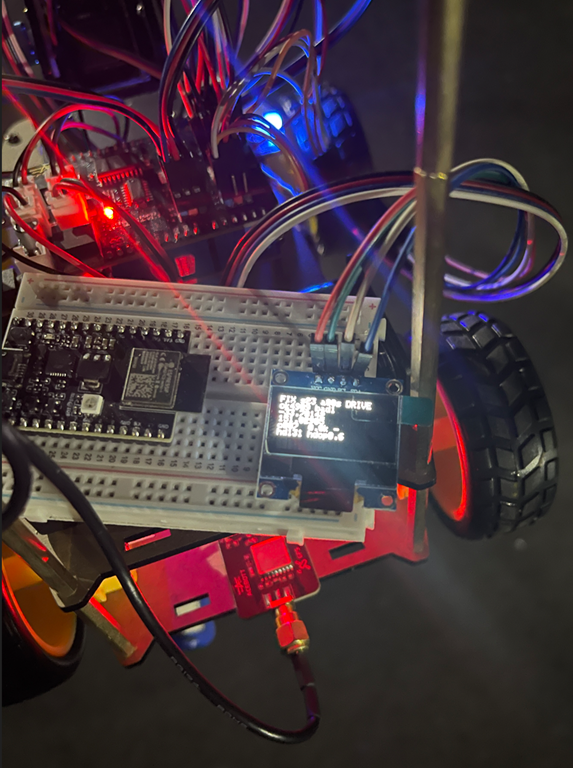
I’ve been busy on another robot car project. This time I wanted to take the Acebott standard QD001 project and combine it with the QD009 GPS add on and have it navigate using GPS. This turned out to be harder than expected.
The main learning was that GPS isn’t really accurate enough to assist with robot car movement, due to the extremely small distances that the car travels. However, what I wanted to achieve was to have the robot car at least head north as a test.
The first big change from previous robot car projects was to change the wheels from mecanum to normal wheels. This is because the car would now be outside on much rougher terrain and didn’t need the ability to move sideways. Basically it just needed to drive around, so normal wheels it was.
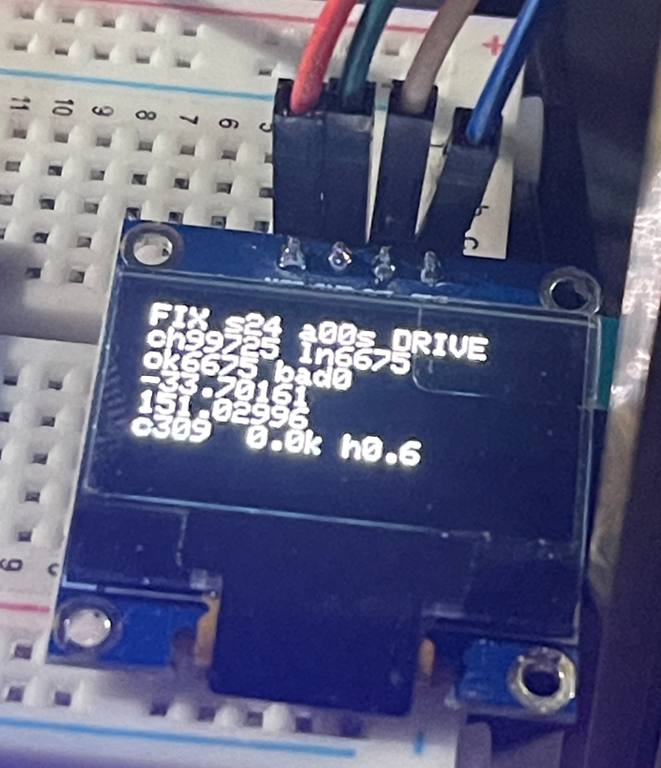
During the initial debug process I added an OLED screen, which I kept, so I could try and see what was going on with the car during movement. In the end that didn’t work to well, especially given how small the OLED screen was. For much better debugging I logged movement data to an adafruit.io data feed. That meant that the car needed Internet access, which I provided by hot spotting my phone.
It took much back and forth with AI to eventually end up with code that did what I wanted. You’ll find the code here:
https://github.com/directorcia/Azure/blob/master/Iot/Acebott/Smartcar/QD009/gps.ino
What gps.ino does
This is an Arduino/ESP32 sketch for an ACEBOTT QD009 four-wheel smart car (an ESP32 board with a 74HC595 motor shield). It fits a GPS module, an OLED display and WiFi telemetry. Its main job is a “drive north” test. The car has no compass, so it uses only GPS to work out which way it’s heading, then steers itself until it’s travelling north.
Hardware and libraries
- TinyGPS++ parses the NMEA sentences from the GPS module, which is wired to GPIO 27 (RX only, since the TX pin is
-1) at 9600 baud.
- Adafruit SSD1306/GFX drives a 128×64 OLED over I2C (SDA 21, SCL 22).
- WiFi and Adafruit MQTT publish a log line to an Adafruit IO feed called
car-log.
telemetry_secrets.hholds the WiFi and Adafruit IO credentials. It’s gitignored, so it isn’t in the repo.
esp_system.hand thesoc/rtc_cntl_regheaders are used for reset-reason diagnostics and for disabling the brownout detector.
Motor control
The motors aren’t driven directly. Two PWM pins set speed (GPIO 19 for the right side, GPIO 23 for the left), and a 74HC595 shift register sets direction. The code shifts out one byte whose bits select forward or reverse for each of the four motors. For example, DIR_FORWARD = 163 (0xA3) and DIR_SPIN_LEFT = 83 (0x53).
setMotors() is the core function. It records the last command, applies the motor trim, sets the PWM, and latches the direction byte into the shift register.
Trim: the left and right motors don’t produce equal thrust, so the car drifts. motorTrim (default 85) boosts the left PWM and reduces the right PWM, scaled by speed relative to the speed it was calibrated at (200). Trim is deliberately not applied during in-place spins. Unequal sides would make the car arc instead of rotate, so turn angles would differ by direction.
turnPwm() forces spins up to at least 240 PWM, because a 4WD skid-steer car stalls on low-power spins.
The GPS “drive north” state machine
handleGpsNorthTest() is a non-blocking state machine that runs from loop(). It starts automatically at boot (AUTO_GPS_NORTH_ON_BOOT) or when you press n.
-
WAIT_FOR_FIX: The car stays stopped until it has a valid GPS location newer than 5 seconds. It then requires the fix to be held continuously for 2.5 s. It records that position as the baseline, then starts driving forward at PWM 155.
-
DRIVE_FORWARD: It drives for 5.5 s. While moving, it samples the receiver’s own course-over-ground, but only if speed is at least 1.5 km/h. Below that, the receiver’s course is noise. After 5.5 s it stops.
-
COMPARE: After a 2.8 s settle to let GPS update, it works out which way the car actually went:
- It computes the distance and bearing from the baseline to the new position.
- If the car moved at least 3 m, it trusts the displacement bearing, because GPS position noise is about 2-3 m and a bearing from a shorter move is essentially random.
- Otherwise it falls back to the receiver’s Doppler-derived course sampled while driving, if there is one.
- If it has neither, it doesn’t guess. It drives forward again to build a longer baseline.
- The heading error is that heading wrapped to ±180°, since north is 0°. If the error is within ±28° (
GPS_COURSE_TOLERANCE_DEG), the car is going north, so it resets the baseline and drives on. Otherwise it turns.
- It computes the distance and bearing from the baseline to the new position.
-
TURN: This is an open-loop turn with no feedback during the turn itself. Duration is
error ÷ 90°/s, clamped between 180 ms and 1400 ms. If the error is positive (east of north) it spins left, and if negative it spins right. A code comment says this was previously inverted, which made the car spiral away from north. After the turn it goes back to WAIT_FOR_FIX to take a fresh baseline, because the old one is stale.
Safety: after 8 consecutive turns without success, it stops (GPS_MAX_CONSECUTIVE_TURNS). Any manual drive command also cancels the test.
In short, the car drives a bit, measures how it moved, corrects by a calculated turn, and repeats.
OLED display
handleLcd() refreshes every 400 ms and shows:
- WiFi status.
- GPS lock state (
FIX,NMEAif data is arriving but there’s no fix, orNO), satellite count, fix age and current mode.
- Checksum pass and fail counts.
- Latitude and longitude.
- Current course, speed, last turn direction (L/R), last travel heading and HDOP.
It’s also fault-tolerant:
recoverI2CBus()bit-bangs up to 9 clock pulses to free a stuck SDA line, which happens if the OLED powers up more slowly than the ESP32.
- Every 2 s it checks that the display still acknowledges on the bus. If it doesn’t, it re-initializes without needing a power cycle.
- If init fails, it retries every second indefinitely.
Telemetry
handleWifi() reconnects in the background without ever blocking. handleTelemetry() runs every 10 s (to stay under Adafruit IO’s free-tier rate limit) and publishes a single log string to the car-log feed. It contains uptime, mode, state, lat/lng, heading, satellites, NMEA counts, checksum stats, turn count and turn direction. The same line goes to the serial monitor.
Diagnostics and robustness
- Brownout detector disabled (
WRITE_PERI_REG(RTC_CNTL_BROWN_OUT_REG, 0)): a weak battery could otherwise cause a silent reset loop during boot.
- Boot counter in RTC memory (
RTC_DATA_ATTR bootCount) survives software and brownout resets. A rising count without a physical power cycle means the board is reset-looping.
- LED blink codes (
blinkDiagnostic) flash the reset-reason code, then the boot count, so you can diagnose problems even if the OLED stays blank.
- External LEDs show status: slow alternating means no GPS data, fast alternating means NMEA bytes are arriving, and both solid means the motors are driving in the north test.
Serial commands
Key
Action
w s a d
Forward, backward, spin left, spin right
space / x
Stop everything
t
Wheel diagnostic: runs six tests (forward, back, spins, left-only, right-only)
b
Timed 4 s straight run to measure drift for trim calibration
[ ]
Adjust trim by -1 / +1
p
Print trim
c
Toggle continuous loop test (forward, back, spin left, spin right, with pauses)
g
Toggle raw NMEA output
n
Start or stop the GPS north test
+ -, 1–5
Change speed (presets 160, 185, 210, 235, 255)
h / ?
Help
Setup and loop
setup() runs in this order: disable brownout, increment the boot count, start serial, blink diagnostics, init motors, OLED, GPS and WiFi, then a 3-second countdown. If auto-start is enabled, it then arms the north test.
loop() calls each handler in turn (serial commands, continuous test, LEDs, GPS parsing, OLED, north state machine, WiFi, telemetry), toggles the heartbeat LED each second, and sleeps 8 ms. Nothing blocks, so GPS parsing, the display and WiFi all keep running while the car drives. The exception is the blocking delayWithExternalLedFlash() used in the diagnostic routines, which at least keeps parsing GPS and updating the display while it waits.
Limitations
- GPS course only works while moving, and accuracy is about 3 m, so this suits open outdoor areas and not indoors.
- The turns are open-loop and rely on a measured 90°/s yaw rate, so surface and battery level will affect accuracy. The state machine corrects for that by re-measuring after each turn.
- The car starts moving on its own about 3 s after boot once it has a fix, so keep it clear of obstacles.

