


After setting a 3D print on my Snapmaker Artisan to run overnight, I returned to find that it had failed and whole print had amalgamated into a single enormous blog hanging from the print head. DAMM!
So, I heated each nozzle to the operating temperature and then did a load to force the printed lump away from the print head.I cleaned the nozzles as best as I could and I continued on with the 3D printing.
However, once I had removed the 3D print head in exchange for the laser to do some etching I found that my 3D nozzles where a bite worse for wear as seen in the above photo.
When I’m finished with my etching work I’ll recommend the 3D print head but NOT connect it to the X axis so I can turn it upside down for better access. I’ll again heated each nozzle to the operating temperature and try and scrap away as much junk as I can CAREFULLY!
I also see that I can buy some new Hot End for Dual Extrusion modules from Snapmaker which I may end up doing anyway as I see they have a 0.2mm nozzle as well as a hardened 0.4mm nozzle.

You get the 0.4mm nozzle when you purchase the unit as shown above. The nozzle size is denoted in the labels for each when you open the print head as shown.
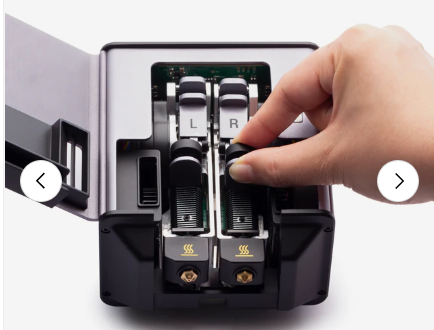
Seems like you can simply ‘pop out’ the print heads as shown above. So, hopefully not a major deal if it comes to that. But first, let me try and see if I can clean the existing nozzles up without damaging them.

