

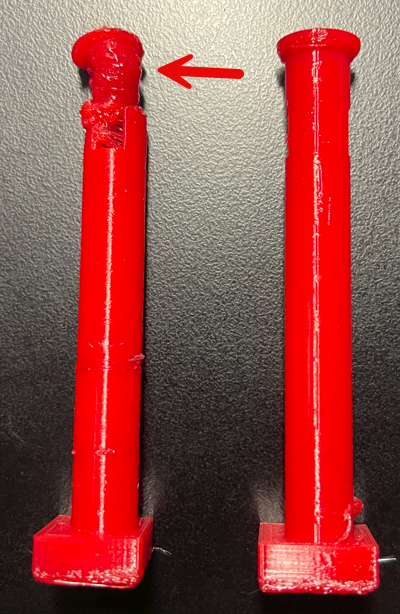
I am still trying to work out why I occasionally get these random blob prints! As you can see the model on the left works fine until towards the end when it goes all ‘blobby’ for some reason??
I have seen this before when attempting to print a cog, but I’ve never bothered to isolate it. In this case, the first print was fine, then second ended in a ‘blob’ and third print was fine. Exactly the same model, no change.
Now I will admit that when I was importing the model it did tell me there was an error and did I wanted that fixed. To which I naturally said “Sure”. Thus, I’m not sure if that is the source of the issues, but if it was a code error, why doesn’t it happen every time I wonder? More investigation it seems.

Luckily, I managed to print out two good columns to finish this model of a Tori gate as you can see above. It is still quite rough as I was testing using PETG this time instead of PLA. I also didn’t use any support and I probably should have looking at the resulting top beam. As always, there is refinement that will be required but I’m happy that I could get this printed without too much hassle.
The original model had the two columns printing together in the same model but that was slow and also created a ‘spiders web’ of filament between the columns. So I canned that and editing that part of the model using TinkerCAD and made a new model with only a single column I printed twice. Much better.
Happy to add this model to my collection and hopefully will get some time to do some refinement to it soon.
 CIAOPS Labs