

After connecting up a
to power and being able to adjust the brightness, the next step was to get i to display some text by connecting the display to an ESP32-S2 Thing Plus.
To do that I needed to connect to these pins on the display:
| LCD Pin name | RS | EN | DB4 | DB5 | DB6 | DB7 |
| LCD Pin | 4 | 6 | 11 | 12 | 13 | 14 |
I planned to connect these LCD pins to the range available on the ESP32-S2 Thing Plus 3,34,33,37,35,36
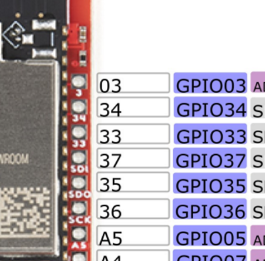
Thus:
const int rs=3; // LCD RS pin
const int en=34; // LCD Enable pin
const int d4=33; // LCD data bit 4 pin
const int d5=37; // LCD data bit 5 pin
const int d6=35; // LCD data bit 6 pin
const int d7=36; // LCD data bit 7 pin
and to initialise:
LiquidCrystal lcd(rs, en, d4, d5, d6, d7);
The size of the display is defined buy:
lcd.begin(16,2);
and then to display text:
lcd.print(“Hello world!”)
My code compiles ok, but I get not text on the LCD display?
– I triple checked my wiring and even tried other ports (no luck)
– I defined each pin via pinmode(rs,OUTPUT); for example (noluck)
Seems like the best solution is go for this:
I2C LCD Backpack for 1602 to 2004 LC
which basically removed the need for individual ports in favour of using SDA and SCL to do the communications. In fact, I probably should have bought this to start with:
Gravity: I2C LCD1602 Arduino LCD Display Module (Blue)
which has the backpack module included!
In the long run this is a better bet as it saves and stack of pins on the ESP32-S2 Thing Plus being consumed.
I did notice that all the GPIO pins on the ESP32-S2 Thing Plus are 3.3V and perhaps the LCD display requires 5V? I couldn’t find any definitive on that.
 CIAOPS Labs
2 thoughts on “No output to display”