ACEBOTT Smart car – Bringing it all together

blog

It is now time to bring all the pieces together on the Acebott Smart Car and make it a movable platform that can stream live video.
Screenshot 2026-01-04 101028

Screenshot 2026-01-04 101245

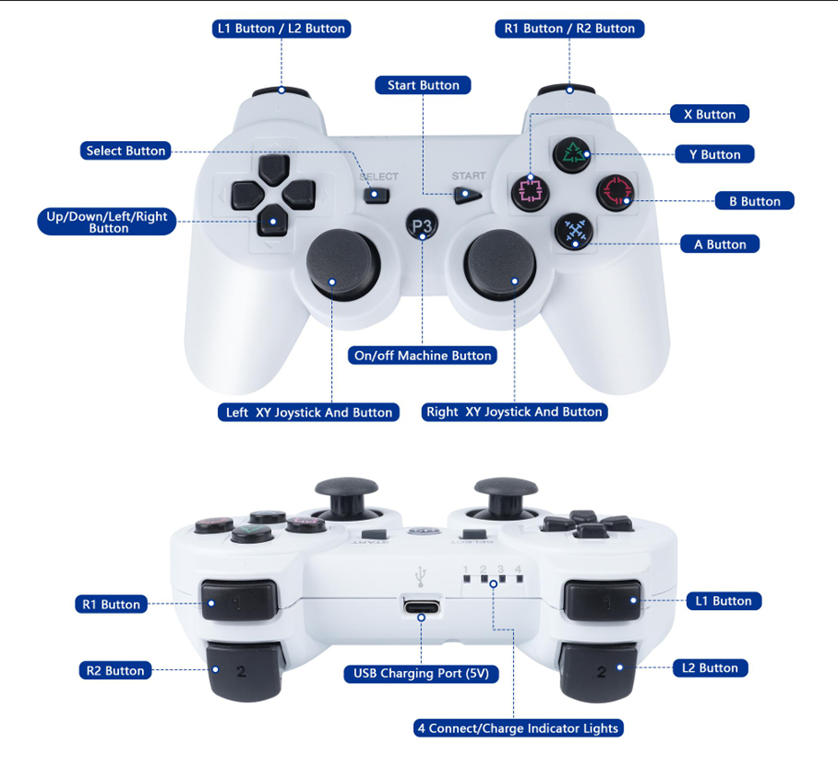
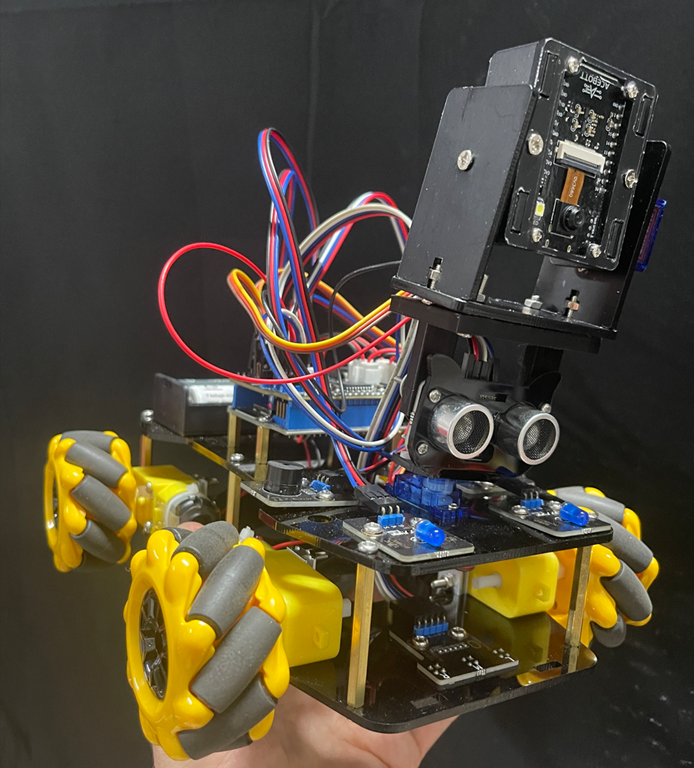
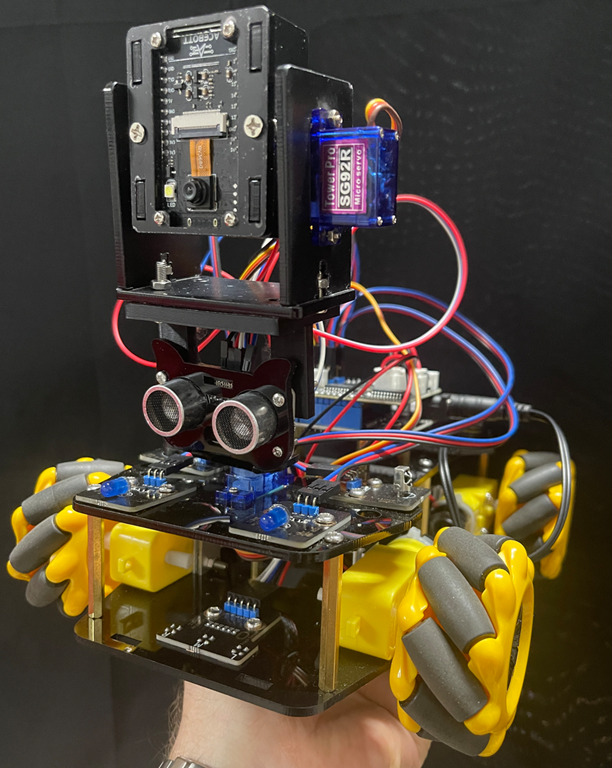
I’ve taken the standard ACEBOTT ESP32 Smart Car Starter Kit with Mecanum Wheels and added the ACEBOTT Bluetooth Controller Expansion for QD001 (QD010) to control its movement. I have also added the ACEBOTT ESP32 Camera Expansion pack for Smart Car (QD002) to give the car vision.

You can see that I have kept the ultrasonic sensor from QD001 and simply mounted the camera (QD002) on top to facilitate pan left and right. I could have added an additional servo to control this independently of the ultrasonic sensor, however in the end I decided that it was easier simply to print a 3D mount so the camera unit could sit above the ultrasonic senor and take advantage of the pan left and right servo already in place. I could refine the design with a separate 3D printed mount for the camera unit if desired, but for the sake of getting things working I’ve decide to stay with thsi method.

I have detailed how to get the PS3 controller (QD010) working with the robot car (QD001) here –

https://blog.ciaopslabs.com/2025/12/28/connecting-a-joystick-controller-to-an-acebott-esp32-smart-car/

and I have covered off getting the camera (QD002) working stand alone here:

https://blog.ciaopslabs.com/2025/12/31/connecting-a-webcam-to-an-acebott-esp32-smart-car/

You’ll find the code and documentation in those articles. At a minimum you’ll need to program the camera (QD002) to support the creation of a web server so it can stream the video to a device.

To mount a device with a screen (an old iPhone) to the PS3 controller (QD010) I found this:

Universal smartphone mount for DUALSHOCK 3 (PS3 controller)

that I could 3D print. I did need to slight extend the width of the base to suit my controller but it worked a treat.

Screenshot 2026-01-04 103123

The above version of the holder was my first printing attempt where I broke the lower part of the base holder when attempting to fit on the controller. This lead to me slightly lengthening the model the second time around that fixed the issue. The initial broken model is secured here using some rubber bands but the re done version fits perfectly.

With the code loaded into the robot car (QD001) and the camera (QD002) as well as having the PS3 controller (QD010) connected the end result looks like:

Connecting a webcam to an ACEBOTT ESP32 Smart Car

blog

With a PS3 style controller connected to an Acebott ESP32 Smart Car my next task was getting the add QD002 ACEBOTT ESP32 Camera Expansion pack for Smart Car working.

I had previously tried to get an Arducam Mega 3MP working and failed miserably, but was highly motivated to overcome that setback with a purpose built camera add on in the Acebott QD002.

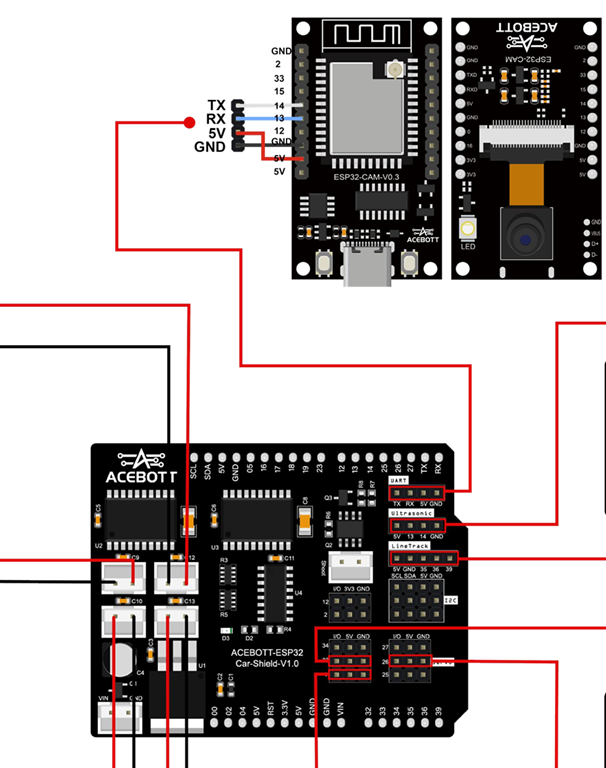
Things did not get off to a great start because the connection process required the camera to be connected to the UART port of the driver board.

Screenshot 2025-12-31 222556

The problem with that is the UART port conflicts with the serial port for uploads and monitoring. This mean hat I needed to disconnect the camera UART connection every time I wanted to update my code and then with it reconnected there was no real way to monitor the result. I either need to go to great lengths to program up and connected a different UART on the board or find another solution.

The easiest solution was to simply upload the code on the ESP32 camera to enable a web server to stream the code directly from the camera board. You’ll find that code here:

https://github.com/directorcia/Azure/blob/master/Iot/Acebott/Smartcar/QD002/ACEBOTT%20QD002%20Camera%20Car%20V3.8/webcam.cpp

and the documentation for it here:

https://github.com/directorcia/Azure/blob/master/Iot/Acebott/Smartcar/QD002/ACEBOTT%20QD002%20Camera%20Car%20V3.8/webcam.md

Thus, the camera board will boot, connect to WiFi, run a web server, report that IP address to the serial console of the web camera board and then stream the camera video there.

I cannot tell you how satisfying it was to finally seeing streamed images on my screen. It had taken a long time to to get here but now, finally, I was ready to finish assembly of the car and mount camera onto it!


Connecting a joystick controller to an ACEBOTT ESP32 Smart Car

blog

After being able to control the Acebott ESP32 Smart car via a web server my next aim was to control it using am Xbox/Playstation style joystick controller.

Initially I thought hat I could use an older Xbox style controller. Turns out these use 2.4Ghz wireless and a proprietary connection. Then I thought I could use a newer style Xbox controller that is Bluetooth, but it turns out they use Bluetooth 5 and use proprietary encryption. I did see a few of these working on the Internet but for the life of me I couldn’t get it to work.

I therefore asked AI which controller would be the easiest to get working and was told to get:

8BitDo Ultimate 2C Bluetooth Controller for Switch/Switch 2, Wireless Controller with 6-Axis Motion Control, Rumble Vibration, Refined D-Pad and Bumpers, and Hall Effect Joysticks (Blue)

This launched me into a world a hurt and failure (thanks AI). In short, this 8BitDo controller appears to also only be Bluetooth 5 and the Acebott ESP32 only supported Bluetooth 4.2 LE (Low Energy).

Making the same mistake twice (what’s the definition of stupidity again?) I asked AI to recommend a different ESP32 board that would work with the 8BitDo and was told that a “ESP32-C3 DevKit” would be the most reliable. I then went and bought an ESP32-C3 Mini Development Board. Even after being ‘100% sure’ that it would work, the AI could not make it work either.

I then came across the ACEBOTT Bluetooth Controller Expansion for QD001, which is designed for the Acebott Smart Car.

image

With this I finally could get the controller talking to the ESP32 on the Smart Car. However, to pair the controller and the ESP32 I needed to specific the MAC address of the controller, which is conveniently on the bottom of the controller. But to get the ESP32 to pair back to the controller I needed to embed the MAC address of the ESP32 Bluetooth connection into the controller. To do this it recommended using a Sixasix Pair tool. For the life of me, I couldn’t get this to work but with my Controller at least paired to the ESP32 I could send commands which is all I really wanted.

I got AI to rewrite the code to allow the PS3 style controller to control the movement of the SmartCar. I have uploaded the code here:

https://github.com/directorcia/Azure/blob/master/Iot/Acebott/Smartcar/QD010/car-ps3.cpp

I also needed to add some speed trimming of the motors because the car was veering off in one direction. The documentation for the above code is here:

https://github.com/directorcia/Azure/blob/master/Iot/Acebott/Smartcar/QD010/car-ps3-overview.md

This whole process proved much harder that I expected and getting a Bluetooth working initially as extremely frustrating given teh different versions and controllers, but now the ‘generic’ PS3 style controller works well!

ACEBOTT ESP32 Smart Car with IR Control

Screenshot 2025-08-28 080437

I got my ACEBOTT ESP32 Smart Car Starter Kit with Mecanum Wheel all wired and so the next challenge was to get it to move. Luckily, the kit comes with an Infra Red Remote control. I therefore wrote this code:

https://github.com/directorcia/Azure/blob/master/Iot/Acebott/Smartcar/irbuttonmap.cpp

To show me what all the buttons on the controller mapped to on the ESP32.

With that complete, I now wrote this code:

https://github.com/directorcia/Azure/blob/master/Iot/Acebott/Smartcar/irmovecontrol.cpp

to get the Smart Car to move by using the IR control. I documented the code here:

https://github.com/directorcia/Azure/blob/master/Iot/Acebott/Smartcar/irmovecontrol.md

The next step will be to run a small web server on the ESP32 and connect to that via local WIFI to move the car.

ACEBOTT ESP32 Smart Car Starter Kit with Mecanum Wheel

Screenshot 2025-08-28 080437

In my on going quest to get a camera working on a robot car and failing with an Arducam, I cam across an existing kit that has an add on extra of a camera. It is the:

ACEBOTT ESP32 Smart Car Starter Kit with Mecanum Wheel

with

ACEBOTT ESP32 Camera Expansion pack for Smart Car

which is going to make achieving my goal much, much easier.

To get the Smart car working you’ll need to nuy some batteries:

1 x CR2025 for the Infra Red Controller

2 x 18650 to the motors and controller board

Assembling the car is pretty straight forward and the kit give you a few spare items for those that you invariably drop on the floor and lose, which is nice. The main challenge I had was with the wiriing. It is always a good idea of take a photo of the components , both sides, BEFORE you assemble them so you can read the pin settings. Case in point, here is the Ultrasonic senor after I had to disassemble it to get the pin settings.

Screenshot 2025-08-28 081429

Hopefully, that saves someone else having to do same.

Here are some more I took of the motor shield board because reading the numbers for the connectors was challenging.

Screenshot 2025-08-28 081600

Screenshot 2025-08-28 081753

With everything finally assembled and powered up I wanted to wire some code to test all the sensors were working correctly. I used this for my tests:

https://github.com/directorcia/Azure/blob/master/Iot/Acebott/Smartcar/diag.cpp

It will flash the LEDs, move the servo for the ultrasonic sensor, test the IR receiver, play tunes on the buzzer and test all the wheels, forwards and backwards for you.

All teh driver files and the instructions can be downloaded here. This will give you everything you need for all the Smartcar kits and add ons.

My next step will be to code the Smartcar so that it moves in response to commands sent to it via the Infra Red controller. Stay tunes.